


Assignment 2: A Basic Compute Farm
Purpose
- Expand your experience working with Java RMI
- Begin to build a Java-centric cluster computing infrastructure.
- Build limited fault tolerance into your infrastructure.
- Introduce thread-safety.
- Use the Replicated Worker design pattern.
- Use the Remote Proxy design pattern.
- Use a Producer-Consumer design pattern.
Motivation
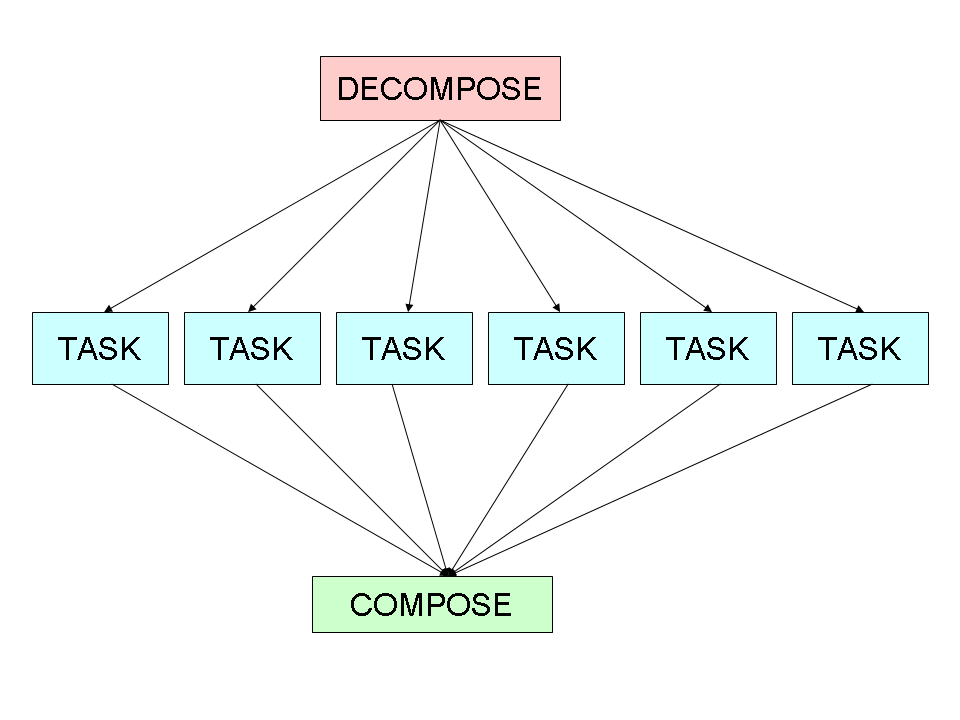
Each large Internet computing project, such as SETI@HOME, tackles some problem that has a simple parallel decomposition. We call such "embarrassingly parallel" problems piecework-parallel, indicating that a problem in this class has a piecework decomposition: The problem decomposes into objects that implement Task, and whose execute methods return values that can be composed into a solution to the original problem.
Paper Summary
Submit a 1-page summary, entirely in your own words, of the paper titled, "How to Build a ComputeFarm."
Specification
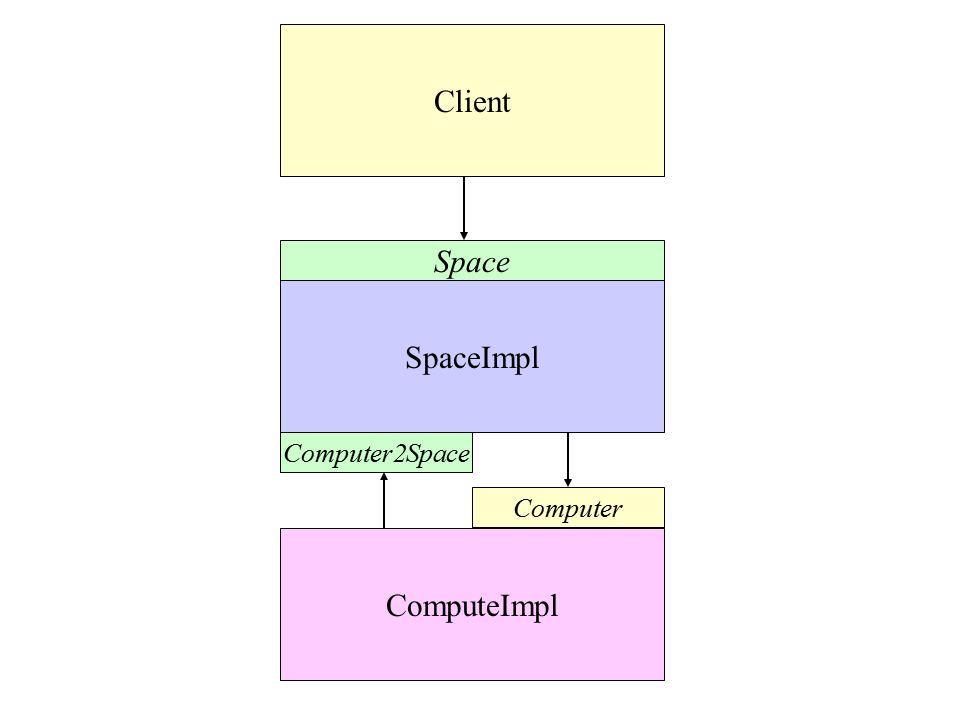
In this assignment, you build a basic compute farm infrastrure for hosting piecework-parallel problems. The client decomposes the problem, constructing a set of Task objects. These tasks are passed to a Space, which makes them available to compute servers, called Computer objects, which function much like those in your first assignment. The results computed by Computers are returned to the Space. The client retrieves results from the Space, composing them into a solution to the original problem.
The API
Task
package api;

public interface Task<T extends Serializable> extends Serializable
{
    Result<T> execute();
}
The Result container
Result<T> class has:
- a task execute method's return value of type T.
- the elapsed time of the task execute method, as seen by the computer that executes it: The code for obtaining this time is not a part of the implementation of Task's execute method; it is part the Computer execute method.
package api;

public class Result<T extends Serializable> implements Serializable
{
    private T taskReturnValue;
    private long taskRunTime;

    public Result( T taskReturnValue )
    {
        assert taskReturnValue != null; // disable in production
        this.taskReturnValue = taskReturnValue;
    }

    public T getTaskReturnValueType() { return taskReturnValue; }

    public void setTaskRunTime( long taskRunTime )
    {
        assert taskRunTime >= 0;
        this.taskRunTime = taskRunTime;
    }

    public long getTaskRunTime() { return taskRunTime; }
}
The Computer interface
package system;

public interface Computer extends Remote
{
    <T extends Serializable> Result<T> execute( Task<<T> task ) throws RemoteException;

    void exit() throws RemoteException;
}
The Space interface
package api;

public interface Space extends Remote
{
    public static String SERVICE_NAME = "Space";

    void put( Task task ) throws RemoteException;

    Result take() throws RemoteException;

    void exit() throws RemoteException;
}
The client decomposes the problem into a set of Task objects, and passes them to the Space via the put method. In principle, these task objects can be processed in parallel by Computers. Since the client puts tasks into the Space and the Computers take tasks from the Space (or the Space takes tasks to give to Computers), the process fits the Producer-Consumer design pattern. Please consult section 5.3 of the textbook for advice. After passing all the task objects to the Space, the client retrieves the associated Result objects via the take method: This method blocks until a Result is available to return the the client. Since Computers put Result objects into the Space and the client "consumes" we again see the Producer-Consumer design pattern. If the client sent 10 Task objects to the Space, it could execute:
Result[] results = new Result[10];
for ( int i = 0; i < results.length; i++ )
{
    results[i] = space.take(); // waits for a result to become available.
}
If a particular Result needs to be associated with a particular Task (e.g., a Mandelbrot Result), this information is passed as a component of the Task execute method's return value. Based on this association, if it matters, it composes the result values into a solution to the original problem.
The exit method is a deployment convenience: When invoked, the space invokes the exit method on each registered Computer, then exits itself. These exits are implemented via System.exit( 0 ), perhaps after logging some suitable comment that it is going down, with a time stamp. The implementation of each exit method thus cause the invoker to receive a RemoteException.
The SpaceImpl class
- Extends UnicastRemoteObject
- Implements the remote Space interface described above.
- Implements a remote interface, called Computer2Space, defined below.
- Has a thread-safe Task queue
- Has a thread-safe Result queue
- Tolerates faulty Computers
- Registers in an RmiRegistry, which both clients and Computers consult.
package system;

public interface Computer2Space extends java.rmi.Remote
{
    void register( Computer computer ) throws java.rmi.RemoteException;
}
Faulty Computers
For the purposes of this assignment, a computer is defined to be faulty when a Remote method invoked on it returns a RemoteException. The Space accommodates faulty computers: If a computer that is running a task returns a RemoteException, the task is assigned to another computer.
The Space implementation's main method instantiates a Space object and binds it into its rmiregistry.
The space's implementation of register should instantiate a ComputerProxy, which is a separate thread. This thread's run method loops forever, removing tasks from a queue, invoking the associated Computer's execute method with the task as its argument, and putting the returned Result object in a data structure for retrieval by the client. These data structures need to be thread-safe. Why? The Java BlockingQueue may be useful, as well as its LinkedBlockingQueue implementation.
The Computer Implementation
- Implements the Remote Computer interface.
- Extends UnicastRemoteObject
- Its main method gets the domain name of its Space's machine from the command line. Using Naming.lookup, it gets a remote reference to the Computer2Space service from the rmiregistry.
- Registers itself with the Space: Computers do not register themselves into an RmiRegistry.
Thread Safety
When an object implements a Remote method, the JVM allows that method to be invoked concurrently by multiple threads. Synchronizing access less than necessary leads to race conditions. One way to avoid race conditions is to declare all of the object's methods synchronous. However, this is not always possible. For example, if the object implements the Runnable interface, its run method may not be declared synchronous. In this case, when the run method accesses the object's state, put that code fragment in a synchronous block. Synchronizing more than necessary may lead to deadlock and livelock: Synchronization must be used carefully.
From section 4.1 of the textbook concerning the design process for a thread-safe class:
- Identify the variables that form the object's state;
- Identify the invariants that constrain the state's variables;
- Establish a policy for managing concurrent access to the object's state.
Please refer to the textbook for further guidance.
Task classes
For each of the Task classes that you defined in the 1st assignment, define a corresponding Task class that solves part of the original problem. The decompositions need not be masterpieces of efficiency. For the TSP, partition the set of all possible tours. For example, if there are n cities, you can partition the set of tours into n - 1 parts: those that begin with cities
- 1, 2, ...
- 1, 3, ...
- ...
- 1, n, ...
The clients
Define a client for each application that:
- gets the domain name of a Space's machine from the command line;
- gets a remote reference to the Space service from the rmiregistry.
- for its application (Mandelbrot or TSP), it:
- instantiates a large problem instance;
- Mandelbrot problem instance parameter values:
- Real: -0.7510975859375, imaginary: 0.1315680625. Here is what the image should look like, modulo your color scheme. With respect to rendering, handle the y coordinate properly, otherwise your image will be inverted.
- edge length: 0.01611
- 1024
- 512
- EuclideanTsp problem instance: use the following list of 12 cities as a problem instance:
Each line that follows has the x and y coordinates of a city, starting with city 0 and ending with city 11:
double[][] cities =
{
	{ 1, 1 },
	{ 8, 1 },
	{ 8, 8 },
	{ 1, 8 },
	{ 2, 2 },
	{ 7, 2 },
	{ 7, 7 },
	{ 2, 7 },
	{ 3, 3 },
	{ 6, 3 },
	{ 6, 6 },
	{ 3, 6 }
}
If you plot these cities, then (I think) a minimal tour is: 0, 4, 8, 9, 5, 1, 2, 6, 10, 11, 7, 3. (Since I have arrived at this solution by inspection, this may not be optimal.) The cost of this tour is 20 + 8sqrt(2). - suitably displays the arguments.
- decomposes the problem instance into tasks, sending each to the Space via the put method;
- retrieves the results from the Space via take, and composes them into a solution to the original problem, which is displayed suitably.

The Job interface
Similar to the Compute Farm, you may wish to define and implement a Job interface. The main advantage of doing so is to increase code reuse among different clients and execution scenarios (see Experiments below). The Don't Repeat Yourself (DRY) design maxim is a energy investment strategy that generally yields dividends.
Experiments
- Start a Space
- Start c Computers.
- For each client:
- Record the elapsed time for each task, as seen by the Computer. Record the average task time, as seen by the Computer.
- Record the elapsed time for each task, as seen by the Client. Record the average task time, as seen by the Client.
- Record the elapsed time for the client's job (e.g., a Mandelbrot Set visualization) (i.e., after the execute return values have been composed into an overall solution).
Repeat the above steps for c = 1, 2, and 4. Graph the elapsed time for each problem over c, for each problem. For the case of c = 1, get completion time for 4 deployment scenarios:
- client, executes the tasks itself
- client, Space, and computer are all instantiated in the same JVM
- client, Space, and computer are instantiated on different JVMs running on the same machine
- client, Space, and computer run on different machines.
Analysis
- Offer an explanation for the differences in job execution times.
- To improve your understanding of what is going on, what other measurements would you like to see included?
- Include comments about improving the infrastructure architecture.
Deliverables
Directories
- documents- has an index.html file that contains links to:
- readme.html: provides any explanation needed to build your system, and and run each component.
- javadoc, a directory that contains the javadoc of your
- api interfaces
- Task classes: constructor parameters and execute method return values.
- experimental results: a spreadsheet.
- your analysis, in either html or pdf.
- your paper summary, in either html or pdf.
- source - a directory containing the following subdirectories, reflecting the package structure:
- api, which contains Task, Result, and Space.
- client, which contains your client class[es]
- system, which contains your Computer, Computer2Spaces, ComputerImpl, and Space classes.
- tasks, which contains your Task and Result classes (each Task/Result class pair may be in a subpackage, if you prefer)
- library - has executables, typically jar files, that are not written by your team, but are needed to run your project.
- policy - has policy file[s].
Files
- build.xml file with targets to:
- build: builds your system: Creates a computer.jar, space.jar, and client.jar, and tasks-dl.jar.
- runSpace: starts a Space.
- runComputer: starts a Computer .
- runMandelbrotSetClient: starts a Mandelbrot Set client .
- runTspClient: starts a TSP client .